
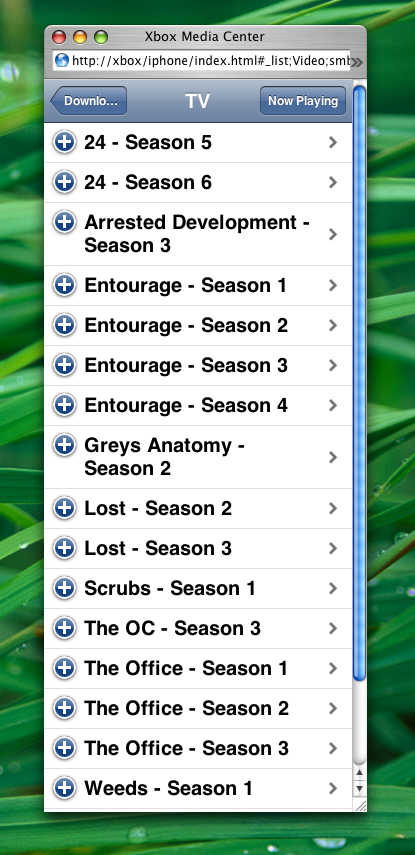
This project aims to provide an easy to use yet powerful remote control for Xbox Media Center using Apple's iPhone. Xbox Media Center is an open source application that can be run on a modified Xbox to play audio, video, DVDs, photo slideshows, and other media.
iPhone's web browser (based on WebKit) can display full interactive webpages, and Xbox Media Center (XBMC) contains a simple web server that can store web page and react to various commands like pause, play, volume control and many more. The remote is written entirely in JavaScript, HTML, and CSS, and makes use of iUI, a framework for iPhone-like interfaces on web apps, written by Joe Hewitt.
Using iUI allowed us to create an interface very similar to the iPhone's native interface, which is also very easy to use.
The iPhone is the primary target platform, and thus the core developer's main focus. That said, XBMC iPhone Remote is completely open source (under the BSD license), so feel free to modify it for compatibility with other browsers and devices. If it can be modified in a clean way and remains compatible with the iPhone, we can merge your changes into the main branch. Please contact Tom Robinson at if you would like your modifications merged.
XBMC iPhone Remote is still a work in progress. Listed below are the partially and fully implemented features, as well as some future features.
A modded Xbox with Xbox Media Center installed is, of course, required. Please see other resources for instructions on modding your Xbox and installing XBMC.
XBMC iPhone Remote has only been tested on recent (2007) versions of Xbox Media Center. If it does not seem to work, please ensure you have a recent version of XBMC installed.
The interface works best on an actual iPhone, but will also function on Safari 3.0 Beta for Mac OS X or Windows, and to a lesser extent on Firefox. It does not work well on Internet Explorer, Opera, or the PSP web browser, and has not been tested on other browsers or devices.
Once you have XBMC installed, enable XBMC's built in web server in the "Settings" : "Network" : "Servers" screen. It is also recommended that you enable password protection on the XBMC web server, but note that even this is not completely secure.
You can use the automated web installer (modified from LiquidIce's) or follow the manual instal instructions.
If you are concerned about the security of XBMC's web server and the web installer, please read these notes.
Enter your Xbox's IP address below, and make sure XBMC is currently running, then press "Install". If everything goes ok, after about 10 seconds your installed and fully functional XBMC iPhone Remote should be displayed below. If you have password protection enabled, log into the web server first (by browsing to http://xbox/ where "xbox" is replaced with the actual IP address of your Xbox), otherwise you may have to run web install twice.
Thanks to LiquidIce for the sample web installer code.
If you would prefer to manually install XBMC iPhone Remote, follow these instructions:
To access the application, point your web browser to http://xbox/iphone/ where "xbox" is replaced with your Xbox's actual IP address.
Using the remote is simple and easy to figure out, but here's a few tips:
Please visit this thread on the MacRumors forums for help.
Please contact Tom Robinson at if you find any other bugs not mentioned here, or if you have any other comments or suggestions.
Xbox Media Center iPhone Remote - version 0.1



Both XBMC iPhone Remote and the modified version of iUI included with it are released under the BSD license.
No warrenty is provided. We aren't responsible for any damage to your Xbox, iPhone, computer, cat, dog, or anything else. Etc etc.


© 2006-2026 Tom Robinson. Some rights reserved.